How to Reset Samsung Freezer: Quick Steps
Your Samsung freezer isn’t cooling properly, and you’re wondering how to reset it without calling a technician. This problem happens more often than you might expect, and the solution is frequently simpler than you think. Whether your display shows an unfamiliar error code, the unit failed to restart after a power outage, or the ice maker seems stuck in an endless cycle, a proper reset often restores normal operation. This guide walks you through every reset method available for Samsung freezers, from simple button combinations to power cycling techniques that solve stubborn software glitches.
Before you begin any reset procedure, take a moment to photograph any error codes displayed on your control panel. This information gets permanently erased during the reset process and can prove invaluable if a technician needs to diagnose underlying issues later. Most Samsung resets take less than two minutes to complete, though you’ll need additional time to reconfigure your temperature settings afterward. Let’s walk through each method step by step, starting with the most common solutions.
Fix Samsung Freezer with Power Freeze and Power Cool Button Reset
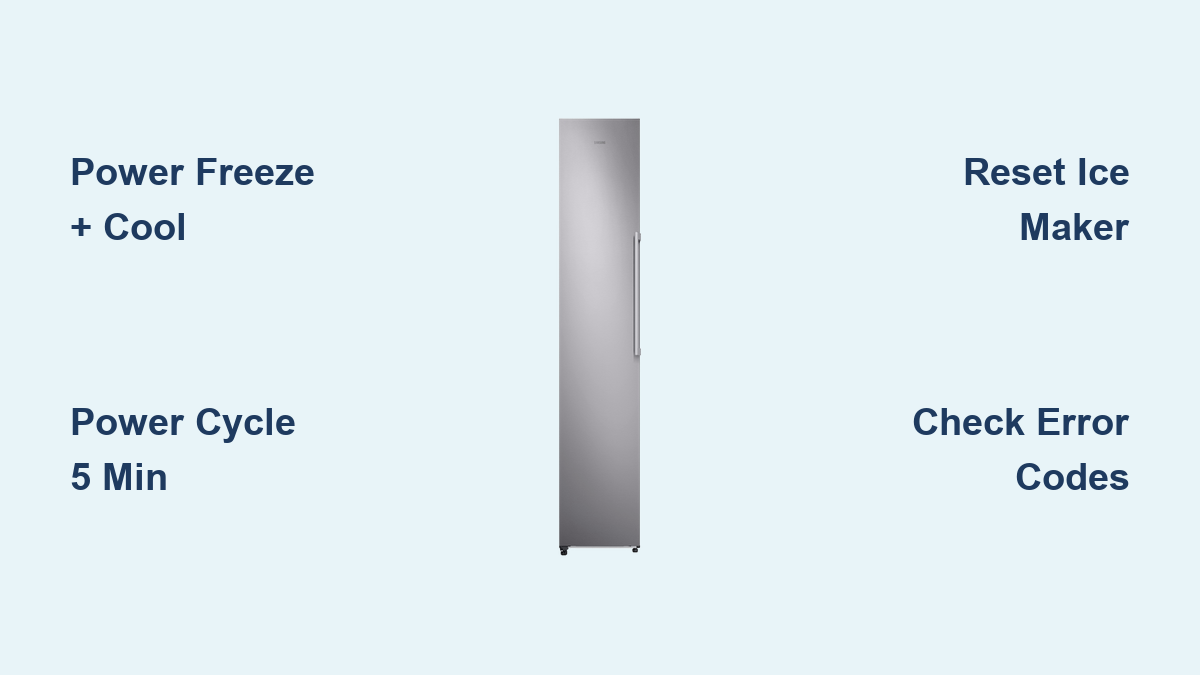
Pressing the right button combination solves most Samsung freezer reset issues immediately. Locate the Power Freeze and Power Cool buttons on your refrigerator’s control panel and press both simultaneously for 5 to 10 seconds. You’ll know it’s working when the display briefly shows “0” or “OFF” before returning to normal operation.
This reset clears temporary software glitches that prevent proper cooling. After releasing the buttons, wait for temperature readings to appear on the display—typically within seconds. Now you’ll need to reconfigure your settings: Samsung recommends 37°F for the refrigerator compartment and 0°F for the freezer compartment for optimal performance.
Some Samsung models use different button combinations. If Power Freeze and Power Cool don’t work, try these alternatives:
- Press and hold Power Save and Energy Saver buttons for 5-10 seconds
- For RS2530BSH models, press Ice Type and Filter Reset buttons instead
- Certain units require holding Fridge and Freezer buttons together
Pro Tip: If you’re unsure which combination applies to your model, consult your owner’s manual before proceeding. Guessing wrong won’t damage your unit but could waste valuable time when your food is at risk.
Restore Function After Power Outage with Complete Power Cycle

When your Samsung freezer fails to restart after electricity returns, a complete power cycle often resolves the issue. This method works especially well for models like RS2533SW, RF26HFP, RFG298HDRS, and others that notoriously shut down completely after even brief power interruptions.
Follow these steps exactly:
- Unplug your refrigerator from the wall outlet (or flip the circuit breaker)
- Wait precisely 5 minutes—this allows capacitors to fully discharge
- Plug the unit back in (or reset the breaker)
- Wait 20-30 minutes for the compressor to stabilize before checking temperatures
For stubborn cases where standard power cycling fails, use this enhanced technique:
- Unplug while simultaneously pressing Power Freeze and Power Cool
- Maintain pressure on both buttons as you plug back in
- Continue holding for 5-10 seconds until temperature readings appear
Warning: Never skip the 5-minute waiting period—this is critical for a complete reset of the internal electronics. Rushing this step means the reset likely won’t work.
Resolve Ice Maker Reset Failures Blocking Freezer Operation
Ice maker malfunctions frequently prevent Samsung freezers from resetting properly because the ice maker assembly controls the entire system in many models. If your freezer won’t reset, the ice maker is likely holding the unit in an “unready state.”
First, check if the Ice Off button on your control panel has been accidentally activated. If the indicator light is on, press the button to re-enable ice production before attempting further resets.
If that doesn’t work, locate the test button beneath the ice maker assembly. Press this small button to initiate the reset sequence—you should see the ice tray rotate and fill with water. On newer models or after filter replacement, you may need to press this button multiple times to bleed air from the water lines.
Expert Note: Accessing the ice maker test button can be challenging—users have successfully located it by using a smartphone in selfie mode to view the area beneath the unit. If problems persist, unplug the ice maker assembly for 30 seconds before reconnecting and attempting another system reset.
Decode Samsung Freezer Error Codes for Targeted Reset Solutions
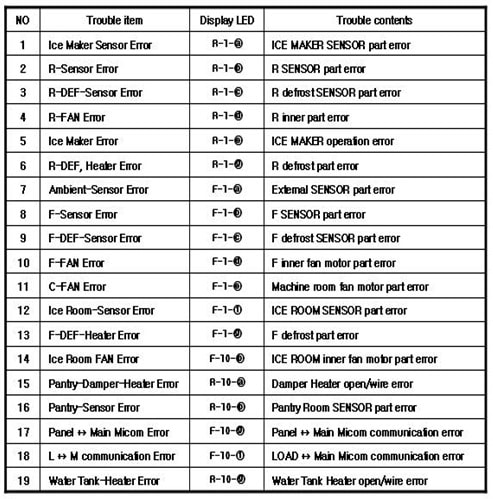
Understanding what your Samsung freezer’s error codes mean determines whether a simple reset will work or if professional service is required. Different codes indicate specific problems that need different approaches.
The “OF OF” or “O FF” code indicates Cooling Off mode (Demo mode), not a malfunction—simply turn off Demo mode through settings rather than performing a full reset. The “88 88” code appears after power outages and typically resolves with a standard reset.
Watch for these critical indicators:
- Control panel blinking “33” or showing a single blue flashing line: Unit failed to restart after power interruption
- Completely dark control panel: Either power supply issue or faulty control board
- Multiple blinking bars during startup: Self-diagnostic has detected component problems
Pro Tip: When your display shows error codes, photograph them before resetting—this information gets permanently erased during the reset process and helps technicians diagnose persistent issues.
Reconnect Wi-Fi on Samsung Smart Freezers After Network Resets
Wi-Fi enabled Samsung freezers require specific network reset procedures when changing networks or troubleshooting SmartThings integration issues. Standard Wi-Fi models need a different approach than Family Hub models.
For regular Samsung refrigerators with Wi-Fi:
– Press and hold the LOCK button for approximately 12 seconds
– Watch for “A” and “r” to appear on the display confirming reset
– Reconnect through the SmartThings app with your network credentials
Family Hub models require these steps:
1. Navigate to Settings on the display
2. Select Wi-Fi
3. Choose your network address from the list
4. Select Disconnect or Forget to clear network information
5. Set up a new connection by selecting your Wi-Fi network and entering the password
Warning: Network resets erase all wireless information—have your Wi-Fi password ready before starting this process.
Identify When Samsung Control Board Replacement Is Necessary
If multiple reset attempts fail to restore cooling, your control board likely needs replacement. The main control board (part number DA92-00486A) serves as the common replacement component for numerous Samsung refrigerator models experiencing persistent electronic failures.
Look for these definitive signs of a failing control board:
- Non-responsive buttons despite proper power supply
- Persistent error codes that return after every reset
- Partial display functionality (some segments work while others remain dark)
- Complete system failure with no response from control panel
Expert Note: The control board is located behind your refrigerator, typically behind a metal cover on the rear of the unit. Replacement is considered straightforward for those comfortable with basic appliance maintenance. Purchase the part from reputable suppliers like reliableparts.com, repairclinic.com, searspartsdirect.com, or partselect.com—always verify compatibility with your specific model number.
Prevent Future Reset Needs with Proper Freezer Maintenance
Regular maintenance prevents many issues that necessitate Samsung freezer resets and extends your appliance’s operational lifespan. Implement these simple practices to minimize future problems:
Ensure your refrigerator remains level by checking with a bubble level monthly and adjusting the leveling legs as needed. An unlevel unit compromises door seal integrity and disrupts airflow—both essential for consistent cooling.
Clean condenser coils every 6 months—they’re typically located behind the rear access panel or beneath the front kickplate. Dirty coils force the compressor to work harder, increasing energy consumption and accelerating wear.
Perform these critical maintenance tasks:
- Wipe door seals with a damp cloth monthly, checking for cracks or gaps
- Never place hot food directly in the freezer—allow it to cool first
- Set freezer temperature to -2°F or colder for proper ice maker function
- Keep refrigerator compartment at Samsung’s recommended 37°F setting
Pro Tip: Avoid overloading your freezer compartments—proper air circulation is essential for consistent cooling throughout the unit. If temperatures fluctuate, check for blocked vents first before attempting a reset.
By following these targeted reset procedures and maintenance practices, you’ll keep your Samsung freezer running reliably for years while minimizing service calls. Most cooling issues can be resolved with the right reset technique—now you have the knowledge to fix your freezer without waiting for technician availability.